
By Guest Outreachy Team
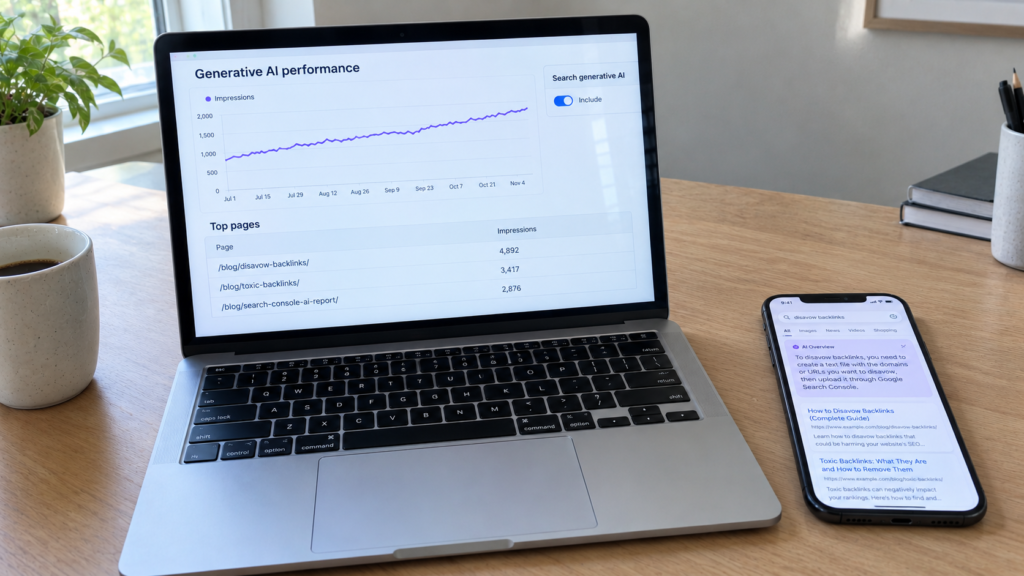
The Search Console AI report is the first place where Google shows you, in its own data, how often your pages appear inside AI Overviews and AI Mode. Its full name is the Generative AI performance report, and as of August 31, 2026 it is available to all websites worldwide. Many site owners opened it, saw a single impressions chart and closed it again, unsure what to do with the numbers.
This guide explains what each part of the report means and what it cannot tell you. It also covers four checks worth running every month and how to decide on the new control that lets you exclude your site from AI features. If you already use Search Console to fix problems like a sitemap could not fetch error, the layout will feel familiar. If you track brand visibility through unlinked mentions SEO, this report adds the Google side of the AI picture.
Table of Contents
Rollout Timeline
- June 3, 2026. Google announced Search Generative AI performance reports on the Search Central blog and opened them to a subset of sites for testing. The post came from Hillel Maoz and Moshe Samet of the Search and Search Console teams.
- June to August. Access widened in stages while Google collected feedback.
- August 31, 2026. Google confirmed that the report and the matching control had rolled out to all websites worldwide.
Google also said it plans to add more metrics over time, so expect the report to change.
Where the Search Console AI Report Lives
Open Search Console, select your property and go to the Performance section. The Generative AI performance report for Search sits there as its own entry. Google Discover has a separate generative AI report, since Discover traffic works differently.
If you do not see it, the Google help page for the report says the usual reason is that your site has not received enough impressions in generative AI features yet. A site that has excluded itself through the new control will not see the report either.
One Metric, Four Dimensions
The report has one metric and four ways to slice it.
| Part | What it shows | Detail from Google |
|---|---|---|
| Impressions | How many times links to your site were shown to a user in a generative AI feature on Google Search | Two results from your site in one AI answer count as one impression in the chart |
| Pages | Which URLs earned those impressions | Grouped by the final URL after redirects, mostly the canonical URL |
| Countries | Where the searches came from | Based on the country of the person searching |
| Dates | How impressions change over time | Day, week or month, in Pacific Time |
| Devices | Desktop, tablet or mobile | Search only |
A search type filter lets you split text searches from multimodal ones. Multimodal covers image based searches such as Google Lens, Circle to Search, uploaded images and Chrome image search.
The newest data can be preliminary. Google marks it with a dotted line and says it may change within a few hours.
Answers It Gives and Gaps It Leaves
The report is useful, but it does not answer every question site owners bring to it.
| You can learn | You cannot learn |
|---|---|
| Whether AI impressions are growing or shrinking | How many clicks came from AI features |
| Which pages appear most often in AI answers | Which queries triggered those answers |
| Which countries and devices drive AI visibility | Whether a page appeared in AI Overviews or AI Mode separately |
| How AI visibility compares with your total Search impressions | Your position inside an AI answer |
| Data from Search Labs experiments, which Google excludes |
Launch coverage from Search Engine Roundtable and others also confirmed that the report has no click or query data. AI impressions still count inside your main Performance report totals. The new report is a separate view of the same data, not extra traffic.
Monthly Checks Worth Running
1. Top pages in AI answers. Sort the Pages table by impressions and save the top 20 URLs each month. These pages show which topics Google trusts you on for AI answers. Keep them fresh, accurate and clearly authored.
2. AI share of total impressions. Compare AI impressions for a page with its total impressions in the main Performance report over the same dates. A rising share means more of the visibility for that page now happens inside AI answers.
3. Impressions versus clicks. Take a page with growing AI impressions and check its clicks in the main Performance report. If impressions rise while clicks stay flat or fall, people may be getting their answer without visiting. Add something an AI summary cannot give, such as tools, templates, original data or a clear next step.
4. Country and device gaps. If a market that matters to you shows almost no AI impressions, check whether your content covers that audience, its spelling and its local details.
Export the data each month. The table keeps the usual limit of 1,000 rows, and values shown as a tilde or a dash export as zeros, so a saved file gives you a clean record to compare later.
Inclusion Control Options
Alongside the report, Google added a setting under Settings, then Search generative AI. It decides whether your site appears in AI features at all.
| Option | Effect |
|---|---|
| Include | Your content can appear in AI features and help ground AI answers. This is the default |
| Exclude | Your links and content do not appear in AI features, and your content is not used as input for AI answers or previews. You get no traffic or impressions from them |
| Inherit from parent | The property follows the setting of its closest configured parent |
Key facts from the Google help page on the control:
- It covers AI Overviews, AI Mode and generative AI features in Discover, and Google says the list may change.
- Google says the control is not used as a ranking or inclusion signal for other parts of Search.
- It does not affect AI training. Google points to the
Google-Extendedsetting for that choice. - Exclusion generally takes a few days. Google says content is excluded within one to two days after the control goes live, with some content taking longer because of caching.
- Child properties can override a parent setting, and the owner of the top level property gets a notice when that happens.
- To remove content from Google Search completely, Google points to noindex, not to this control.
Deciding Whether to Exclude
For most businesses that sell services or products, staying included makes sense. AI answers are a growing part of how people search, and exclusion removes you from them while other sites still appear in your place.
Exclusion can be worth testing for publishers whose value is the full article itself, such as subscription news or paid research, where an AI summary may replace the visit. If you test it, start with a child property such as one folder, watch the report and the main Performance report for a few weeks and only then decide on the whole site.
Whatever you choose, record the date of any change. The report is the main way to measure what the setting did.
Questions Readers Ask
Where is the AI report in Search Console?
Open the Performance section of your property and select the Generative AI performance report for Search. Discover has its own report.
Does the report show clicks from AI Overviews?
No. It shows impressions only. Use the main Performance report for clicks.
Why is the report missing for my site?
Google says this usually means your site has not had enough impressions in AI features yet, or the site is excluded through the control.
Will excluding my site from AI features hurt my normal rankings?
Google says the control is not used as a ranking or inclusion signal for other parts of Search.
Does the report include ChatGPT or Perplexity?
No. It covers Google AI features only. Track other AI tools with separate brand monitoring.
Conclusion: Measure, Then Decide
The Search Console AI report shows how often your pages appear inside AI Overviews and AI Mode, sliced by page, country, date and device. It does not show clicks, queries or which AI feature showed you, so pair it with the main Performance report before you draw conclusions. Track your top AI pages monthly, compare AI impressions with clicks and keep exports for a clean history.
The new control lets you include or exclude your site from AI features. Most businesses gain more by staying in, while publishers whose full article is the product can test exclusion on one section first. Either way, the report is now the clearest Google data you have on AI visibility, and checking it monthly is a small habit with a large payoff.
Pingback: Google AI Mode Links: How to Get Your Site Cited
Pingback: Find 404 Errors in Chrome DevTools: Our Real Fix